Windows 11 was released a couple of months ago, on Oct 5th 2021. It was then rolled out slowly, across the world, to show up as a potential upgrade to Windows 10.
It’s possible that your computer, in the background, is informing you that you coud have Windows 11. Or, it could be telling you that you can’t have Windows 11! How to know?
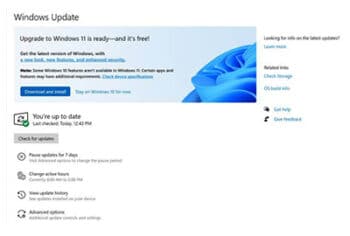
If you click the “Windows Logo” key on your keyboard and the letter “i” key, you bring up the “Settings” screen. Look for “Update & Security” and open that up. (Or click the Start Button and the Settings “Gear Cog” icon.)
If you can get Windows 11 you will see the same screen as in the picture.
If you can’t upgrade there will be a message telling you that. Don’t worry, Windows 10 is just as good, so don’t feel so bad.
Decide whether you wish to upgrade to Windows 11. If you do, then click the “Download and Install”. If you don’t wish to do so then click the “Stay on Windows 10 for now”. Or, do nothing and Microsoft will start pestering you more and more over the next few months.
Should you upgrade?
It’s debatable. Yes, if you like shiny new things and want to know that you have the latest operating system, but don’t mind some initial confusion as things have changed. No, if you’re quite happy with the way your computer is running and don’t wish to take the risk that you may not fix what ain’t broke.
There is a risk, as with any major upgrade, that you could do more harm than good by upgrading. And Windows 10 will remain supported by Microsoft, with security updates and patches, until at least 2025.
Also, any new operating system is better being installed as a fresh build, rather than an in-place upgrade. Otherwise you bring the bad bits of the old system with the upgrade. That’s a service that I can do for you, with the added benefit that a rebuild of a Windows computer – every 2 or 3 years – will make it run much more smoothly.
My own advice, for what it’s worth, is don’t bother upgrading to Windows 11. Keep calm and carry on with Windows 10. I have upgraded and I haven’t broken anything, but I preferred Windows 10 – albeit mostly for minor issues such as a better start menu. But feel free to call me on 01670 432 324 for advice.