Windows Dictation

Did you know that Windows 10 and Windows 11 have a “Voice Typing” feature? If you have a microphone attached to your computer – and any computer with the ability to make a Zoom call will have a microphone – then you can just read out your letter or email and Windows will convert your speech to text.
Try voice typing. By clicking the Windows logo key. And the Handy hitch key. Start doesn’t seem to work so well, does it?
That last paragraph was me dictating; “Try voice typing by clicking the Windows Logo Key and the H key. That doesn’t seem to work so well, does it?”
But don’t let my little experiment put you off! It may be that the software needs some time to recognise my voice and to get used to my accent. You do need to have started the system, by pressing the Windows Logo key and the H key together, then choose where your text is going to appear by clicking the mouse cursor in the right place, then clicking the microphone symbol on the Voice Typing pop-out menu. Simple really. But have fun trying.
There are better instructions from Microsoft HERE, including how to delete some of your text when a mistake is made.
Decent Wi-Fi for Christmas?
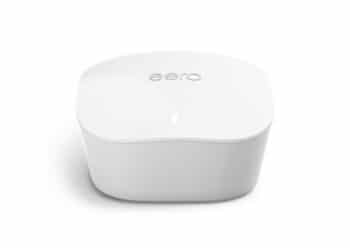
| I’m sure that you’re already looking forward to Christmas, winding down, and thinking of what presents to buy. X-Box, laptop, iPad, mobile phone, printer – even a new Smart TV – and that’s just for yourself! But can your home or office cope with all of the wireless devices that we all seem to have these days? Even the fridge is trying to get connected to the internet. If you’re relying on the small router that sits in a corner of the living room you may be complaining about the speed of connection; even as your broadband provider promises you that your speed is amazingly fast. The problem isn’t your broadband speed into the house, but the sheer number of wireless devices that are all attempting to use one small Wi-Fi connection. The rooms furthest away from the router will get the slowest speed, or even no signal at all. And some devices, especially TV and X-boxes, which rely on video, will be prioritised at the expense of others. The answer used to be “Powerline” adapters, which would extend your Wi-Fi around the house through the electric cables. But these are prone to fluctuations, especially when the microwave is in use, and fairly short lifespans at times. Now, meet Mesh Wi-Fi. Designed to blanket the home or office with strong Wi-Fi throughout, you usually need 3 devices, or Nodes, to cover a 3-4 bed family home. Rather than a Range Extender, which picks up a weak signal and tries to push it further, each Node gives you a full Wi-Fi signal. You plug one Node into your existing router and place the other(s) around the house. They do need to be plugged into an electric socket, but they tend to be very small and discreet, with no other cables. We have the Eero system from Amazon in our house and it’s great. We get full Wi-Fi throughout the house and never think about it anymore. It was really easy to set up too. But we’ve had it for a while now and it no longer tops the charts. See this article for further info, (although it’s a bit techy), and some sensibly written reviews – https://www.expertreviews.co.uk/networks/1406868/best-mesh-wifi-routers |
Telephones & Broadband

| Did you know that we can provide you with telephone systems, via VoIP (Voice over Internet Protocol), or broadband lines? VoIP is a game-changer in these days of Working from Home, or for simple flexibility of working. Your telephone handset is connected through the internet to the phone system, so you can pick up the handset and move it to any other broadband connection, and it works as normal. Same number as before. You can also add a “Softphone” app to your mobile phone, so that you can make and receive calls as if they are from the VoIP handset. You buy the number of handsets that you need, whether that is one or hundreds, pay a licence fee for each number and you’re up and running. You can, of course, do some amazing things, such as call diversion, three-way calling, record calls, etc etc etc. The possibilities are endless. Our Business Broadband packages are equally great value for money, with serious routers to ensure that your system is as secure, as fast, and as efficient as possible. Whether you need VoIP Telephony or Business Broadband call us today on 01670 432 324. |
| Thank you for reading this edition of Read All About IT!, the newsletter from Northumberland Computer Support. This informative bulletin will be published mostly monthly, (or less), with the aim of keeping you up to date with the world of computers. You can, of course, unsubscribe at any time that you wish, but I hope that you enjoyed reading it, and that you forward a copy to your colleagues and friends. Add us to your Safe Senders list, to be sure that this important email doesn’t end up in Spam! |
| Call us today on 01670 432 324 or contact us at https://computer-support.uk/contact-us/ |