Every few months there is a new “Ransomware” scare. You may remember the “Wannacry” bug that hit the NHS a few years ago – which was headline news for a few days. But what is “Ransomware”?
Essentially it is a type of computer virus which slowly, and stealthily, encrypts all of the data on your computers before it pops up a message on your screen telling you that it has done exactly that, and tells you that you must pay in order to obtain a decryption key. And you have to pay in a crypto-currency which is not traceable back to the criminals. Oh, and you have 72 hours to do so and the clock is ticking.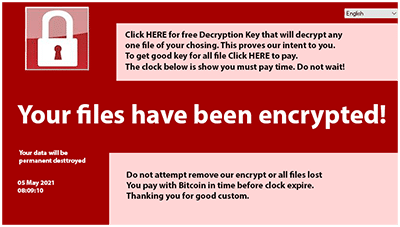
Not only does it infect that computer. It will seek out any other computers attached to the same network, as well as external backup drives, etc. Any data that it can find is encrypted.
If you pay the ransom how do you know that you will get a decryption key? How do you install it? How do you know it will work? What is to prevent further demands being made of you?
So, how do you cope with such a problem? Usually the first step is to call your IT Support company. The Techie on the other end of the line gets a horrible sinking feeling in the pit of their stomach as this can be one of the worst things to happen to a client.
But, surely the anti-virus software prevents such terrible things happening? Not always. We are all used to hearing about variants of the Covid-19 bug and whether or not current vaccines will offer protection against each different variant. In the same way the virus writers are forever seeking new ways to defeat anti-virus programmes and none of them are 100% secure.
A good anti-virus programme is still your first line of defence. We supply and install Webroot Endpoint Protection, which constantly updates itself, so as soon as a new variant appears and Webroot categorises it, you’re protected.
Add another programme, such as the popular Malware Bytes, for added protection. (Not all anti-virus programmes will work together. It is often the case that each sees the other as a threat and they will have a fight inside your computer, with both of them trying to lock perfectly good files. Webroot is one of the very few that happily sits alongside other protective software.)
Employee training is the best defence that you have. Preventative measures are always more effective than any cure. Teach your staff, and yourself, how to spot a rogue email which may be too good to be true.
But, effective backup and Business Continuity practices also have a vital role to play. Cloud Backup, also known as Online Backup, is a much better option than on-site backup. The ransomware can infect any data that it can find on your computer, or through your network, (including storage such as Microsoft OneDrive or Google Drive), but it cannot see your online backup.
Call us today for a free consultation about the most appropriate backup solution for your computers.